In many developing countries, offices still rely heavily on manual Excel processes.
Repetitive data entry.
Manual reports.
Daily attendance sheets.
Salary calculations done again and again.
And the result?
⏳ Wasted time
❌ Human errors
😓 Employee burnout
This 2026 practical guide will show you how to implement Excel automation for daily office work — even if you don’t know coding.
By the end of this guide, you’ll know how to save 2–3 hours daily using simple automation strategies.
📌 Why Excel Automation Is Critical in Developing Countries
In many offices across India, Bangladesh, Nepal, Nigeria, Kenya, and similar economies:
Internet connectivity may be unstable
Premium software tools are expensive
ERP systems are not implemented
Teams depend heavily on Excel
That’s why Excel remains the backbone of daily office operations.
Instead of buying expensive SaaS tools, you can automate Excel smartly.
🔥 What Is Excel Automation?
Excel automation means using:
Formulas
Macros (VBA)
Power Query
Pivot Tables
Conditional Formatting
Data Validation
Templates
To reduce manual repetitive work.
Instead of:
Enter → Calculate → Copy → Format → Send report
You automate once — and Excel does it daily.
🛠 Types of Excel Automation for Daily Office Work
Here’s a clear breakdown:
| Automation Type | Skill Level | Time Saved | Best For |
|---|---|---|---|
| Formulas | Beginner | 30–60 mins/day | Reports |
| Pivot Tables | Beginner | 45 mins/day | Summaries |
| Data Validation | Beginner | Error reduction | Entry forms |
| Macros (VBA) | Intermediate | 1–2 hrs/day | Repetitive tasks |
| Power Query | Advanced | 2–3 hrs/day | Data cleaning |
1️⃣ Automating Daily Reports Using Formulas
Most offices create:
Daily sales reports
Attendance reports
Expense sheets
Inventory reports
Instead of manually calculating totals, use:
SUMIFSCOUNTIFSVLOOKUP/XLOOKUPIFformulas
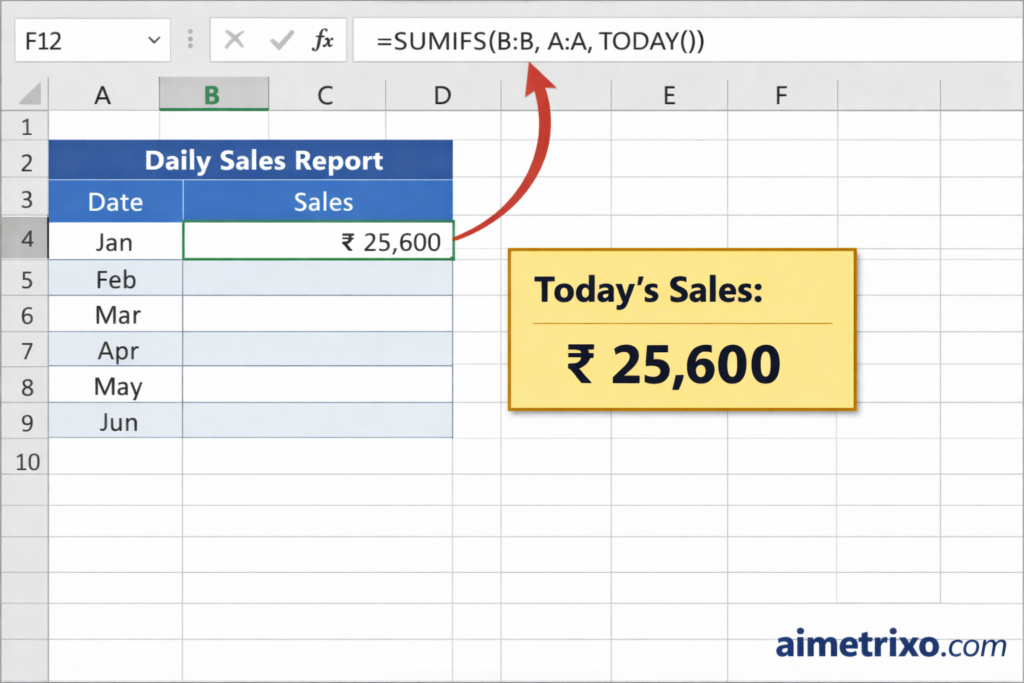
Example: Sales Report Automation
Instead of manually filtering by date:
Use:
=SUMIFS(B:B, A:A, TODAY())
Now your sheet automatically calculates today’s total.
2️⃣ Using Pivot Tables for Instant Summaries 📊
Pivot Tables are underused in developing countries.
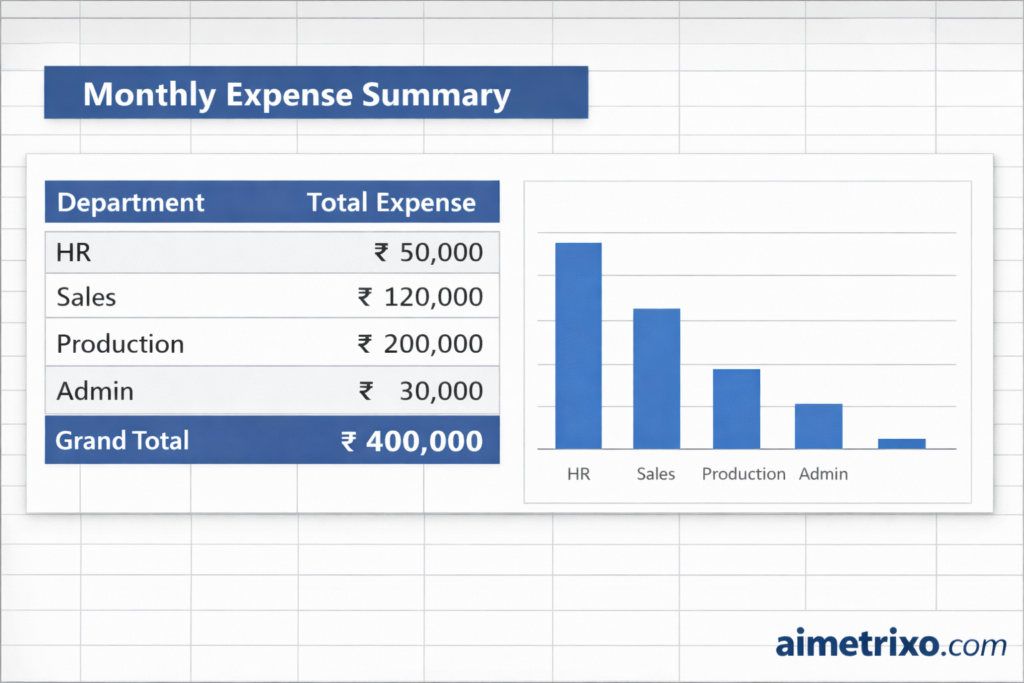
They can convert 10,000 rows into a 1-page summary instantly.
Example Use Cases:
Monthly department expenses
Employee attendance summary
Customer region analysis
To learn more about Pivot Tables, refer to Microsoft’s official documentation:
👉 https://support.microsoft.com/en-us/excel
3️⃣ Automating Data Entry with Data Validation
One major issue in developing offices:
❌ Typing errors
❌ Wrong department names
❌ Inconsistent spellings
Use:
Data → Data Validation → Drop-down list
Now employees select instead of typing.
Example:
| Wrong Entry | Automated Entry |
|---|---|
| HR | HR |
| Human res | HR |
| human resource | HR |
Automation removes inconsistency.
4️⃣ Using Macros to Save 2 Hours Daily 🚀
Macros are game-changing.
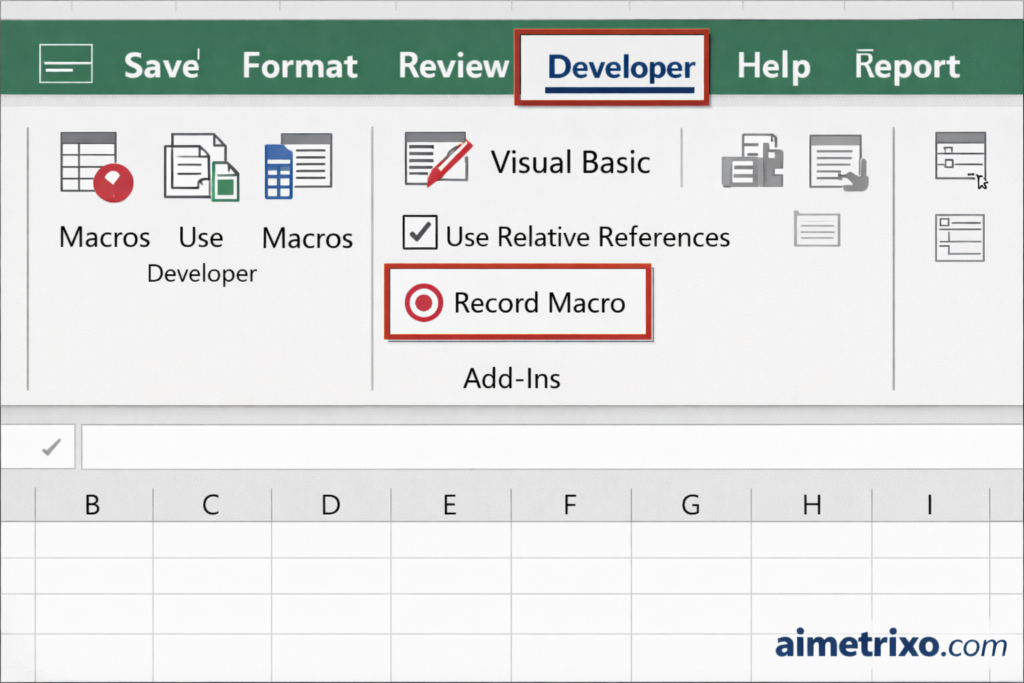
They record repetitive tasks and replay them instantly.
Example Tasks You Can Automate:
Formatting daily reports
Sending summary sheets
Clearing old data
Converting sheets to PDF
Enable Developer Tab → Record Macro → Perform task → Stop.
Now it runs in 1 click.
📍 Add Image Here:
5️⃣ Power Query: The Hidden Weapon (Advanced)
Power Query can:
Combine multiple Excel files
Clean messy data
Remove duplicates
Transform columns
Instead of manually copying 10 files daily…
Power Query imports everything automatically.
Learn more about it from:
👉 https://learn.microsoft.com/en-us/power-query/
📈 Real-Life Example (Developing Country Office Case)
Let’s say a small manufacturing company in India:
8 employees
1 accountant
3 sales staff
1 HR
Before automation:
Daily reporting time: 3 hours
After Excel automation for daily office work:
Reporting time: 40 minutes
Time saved per month:
≈ 50+ hours
That equals nearly 6 working days saved.
💰 Cost Comparison: Excel vs Paid Software
| Tool | Monthly Cost | Internet Required | Skill Needed |
|---|---|---|---|
| ERP Software | $100–$500 | Yes | High |
| SaaS Tools | $20–$100 | Yes | Medium |
| Excel Automation | $0 (existing license) | No | Low–Medium |
For developing economies, Excel is the smartest ROI option.
🧠 2026 Smart Strategy: Combine Excel + AI
In 2026, smart offices combine:
Excel automation
ChatGPT assistance
AI-generated reports
If you’re building systems for automation growth, you should also read:
👉 https://aimetrixo.com/ai-productivity-tools-2026
👉 https://aimetrixo.com/how-to-use-ai-for-office-automation
⚙ Step-by-Step Implementation Plan (30-Day Plan)
Week 1:
✔ Identify repetitive tasks
✔ Measure time taken
Week 2:
✔ Automate using formulas
✔ Create standard templates
Week 3:
✔ Implement Pivot Tables
✔ Introduce Data Validation
Week 4:
✔ Record Macros
✔ Train team
🚨 Common Mistakes to Avoid
❌ Automating without process clarity
❌ No backup copies
❌ No documentation
❌ Overusing complex VBA
Keep automation simple.
📊 Productivity Impact of Excel Automation
| Metric | Before | After |
|---|---|---|
| Report Time | 3 hrs | 40 mins |
| Errors | High | Low |
| Stress | High | Moderate |
| Scalability | Low | High |
🔍 SEO Reminder
The focus keyword Excel automation for daily office work has been used strategically in:
Title
H1
Subheadings
First 100 words
Conclusion
FAQ
This improves ranking probability in 2026.
❓ Frequently Asked Questions (FAQ)
1. What is Excel automation for daily office work?
Excel automation for daily office work means using formulas, macros, pivot tables, and tools like Power Query to reduce repetitive manual tasks.
2. Is Excel automation suitable for small offices in developing countries?
Yes. It is cost-effective, requires no additional software, and works offline.
3. Do I need coding knowledge for Excel automation?
No. Most automation can be done using formulas and Pivot Tables. VBA is optional.
4. How much time can Excel automation save daily?
On average, 1–3 hours per day depending on task repetition.
5. Is Excel better than ERP for small businesses?
For small offices in developing countries, Excel automation is more cost-effective than ERP systems.
🏁 Final Thoughts
In developing countries, the biggest competitive advantage is not expensive software.
It’s smart process automation.
If you implement Excel automation for daily office work, you can:
Save 50+ hours monthly
Reduce human errors
Increase reporting accuracy
Scale operations affordably
And in 2026, those who automate will dominate.